Compare Versions
|
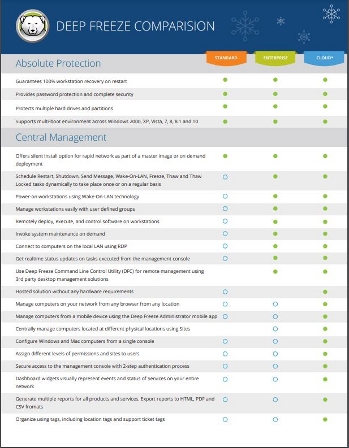
With Deep Freeze you are assured of Absolute Workstation Integrity, upon each and every reboot. Choosing between different versions usually
comes down to the choice of how you wish to manage your installation.
Deep Freeze still gets installed onto your workstation if your choose either On Premise or Cloud solutions.
The choice of On Premise or Cloud comes down to management, features and additional software. |
|
On Premise: If you have 1 or a few Windows PCs, then Deep Freeze Standard is your best choice. If you have more than, say, 10 computers, Deep Freeze
Enterprise is chosen by many customers. Enterprise offers Automation of tasks, and Network management. You can manage the computers with either On Premise consoles,
being the Deep Freeze Enterprise or Core Consoles. If you have Macs, then Deep Freeze
Mac On Premise is the only choice, and it can be managed by Apple Remote Desktop for network management. Deep Freeze Enterprise
remains the most popular choice for customers, with Cloud quickly catching up. On Premise is offered as subscription licenses. |
|
Cloud: The Cloud platform is the focus for all new development for Deep Freeze/Faronics. It allows both Windows and
Mac computers to be managed from the same web based console. It allows for small and large deployments. The Cloud platform is based on AWS. You can think of
Cloud as moving the On Premise console into the Cloud - removing your internal hardware requirements and providing significant improvements. Deep Freeze Cloud is
offered in a number of packages, either, on its own with Deep Freeze Basic, or as a bundle with other Faronics products, with the Premium or Ultimate bundles.
One significant advantage for the Cloud platform is for remote branch networking. Typically, open access PCs in a remote branch library (for example), was always
difficult, with VPNs, Vlans, etc. Now, with the Cloud platform, these remote PCs only need internet access to be fully managed. Cloud is offered as subscription licenses.
|
| Faronics Anti Virus: Deep Freeze can work with your existing AV solution - and there are white papers available detailing this. Faronics Anti Virus was developed to ensure that it would work seamlessly with Deep Freeze - so that daily AV definitions could be applied whilst the workstation was still frozen. Faronics Anti Virus is available for both Deep Freeze Enteprise and Cloud as an optional purchase. On Premise Faronics Anti Virus works with both the Deep Freeze Enterprise and Core Console. It is designed for Windows based workstations only. Faronics Anti Virus is offered as subscription licenses as a standalone product or as an add on to Deep Freeze Enterprise or Deep Freeze Cloud. |
|
Deploy: Applications, Windows Updates and Operating Systems for your entire PC Fleet - Cloud Controlled. Deploy is a Cloud based service with its own distinct login portal. It provides almost all the same features of the Deep Freeze Cloud Ultimate plan less the ablility to Freeze. Faronics Deploy can be viewed at this website. |
||
Deep Freeze Cloud
|
Deploy
|
|
Ultimate Plan
|
||
| Reboot to Restore |  |
|
| Manage Applications | |
|
| Windows Updates | |
|
| OS Deployment | |
|
| Usage Stats & Analytics | |
|
| Remote Connect | |
|